HubSpot Pricing Explained (2026): Features, Seats, and the Cheapest Plan That Works
If you are an enterprise, a serious B2B company, or a scale up with real revenue operations, choosing a CRM is not a software decision.
It is a risk decision.
Your CRM holds the operational memory of your business: customer data, deal history, attribution, automations, SLAs, reporting logic, pipeline governance, and integration glue. Lose control of that, and you do not just lose data, you lose time, trust, and momentum.
That is why HubSpot still wins.
HubSpot is a stable, publicly traded company with a mature product, a consistent roadmap, and a platform that keeps compounding. That matters when you are betting your revenue engine on a system. The flashy alternatives can be great, but many are still “high potential” bets. And betting the company’s customer data on hype is a bold strategy, until it is not.
So yes, HubSpot is still the best enterprise-grade option for many B2B organizations and scale ups.
But.
HubSpot pricing is the boss fight.
This guide will help you win it, without overpaying, without buying the wrong tier, and without discovering six months later that the one feature you needed is locked behind Enterprise.
The Only Source of Truth (And Why Reddit Spreadsheets Are Only “85% Right”)
If you have ever tried to map HubSpot features to pricing tiers, you have probably ended up on Reddit staring at a spreadsheet, thinking:
“Why do I need a feature matrix to buy software?”
You are not alone.
In a recent community thread, people praised a crowdsourced features matrix, while also warning that it contained inaccuracies. One commenter said it was “85% correct,” but pointed out several errors (for example, custom reporting and social are not truly available in Free or Starter in the way people assume). The author agreed with the key point:
The source of truth is always HubSpot’s own documentation, because packaging changes.
That source of truth exists, and it is the one document you should anchor enterprise decisions on:
HubSpot’s Product & Services Catalog:
https://legal.hubspot.com/hubspot-product-and-services-catalog
It is the legal catalog that outlines what products are, what they include, and how services are defined. Use it to confirm features, inclusions, and scope.
This blog is not a replacement for the catalog. It is the guide that helps you interpret the catalog and the pricing pages like a RevOps adult.
Why HubSpot Pricing Feels Confusing (Even for Smart People)
HubSpot pricing is confusing for a simple reason:
The product is modular, but business needs are not.
HubSpot is built from multiple “Hubs”:
- Marketing Hub
- Sales Hub
- Service Hub
- Content Hub (CMS)
- Operations Hub
- Commerce Hub
Each hub has tiers:
- Free
- Starter
- Professional
- Enterprise
The confusion happens because HubSpot pricing pages compress entire feature categories into single bullet points, such as:
- “Social media”
- “Advanced permissions”
- “Custom reporting”
- “Automation”
And those bullets hide nuance.
“Social media” can mean publishing posts, monitoring keywords, routing conversations, or advanced reporting. Depending on what you actually need, the cheapest tier can change.
The pricing pages are generally accurate, but intentionally simplified. And that is why even HubSpot reps sometimes struggle to give clean answers during renewals, as users reported in the thread.
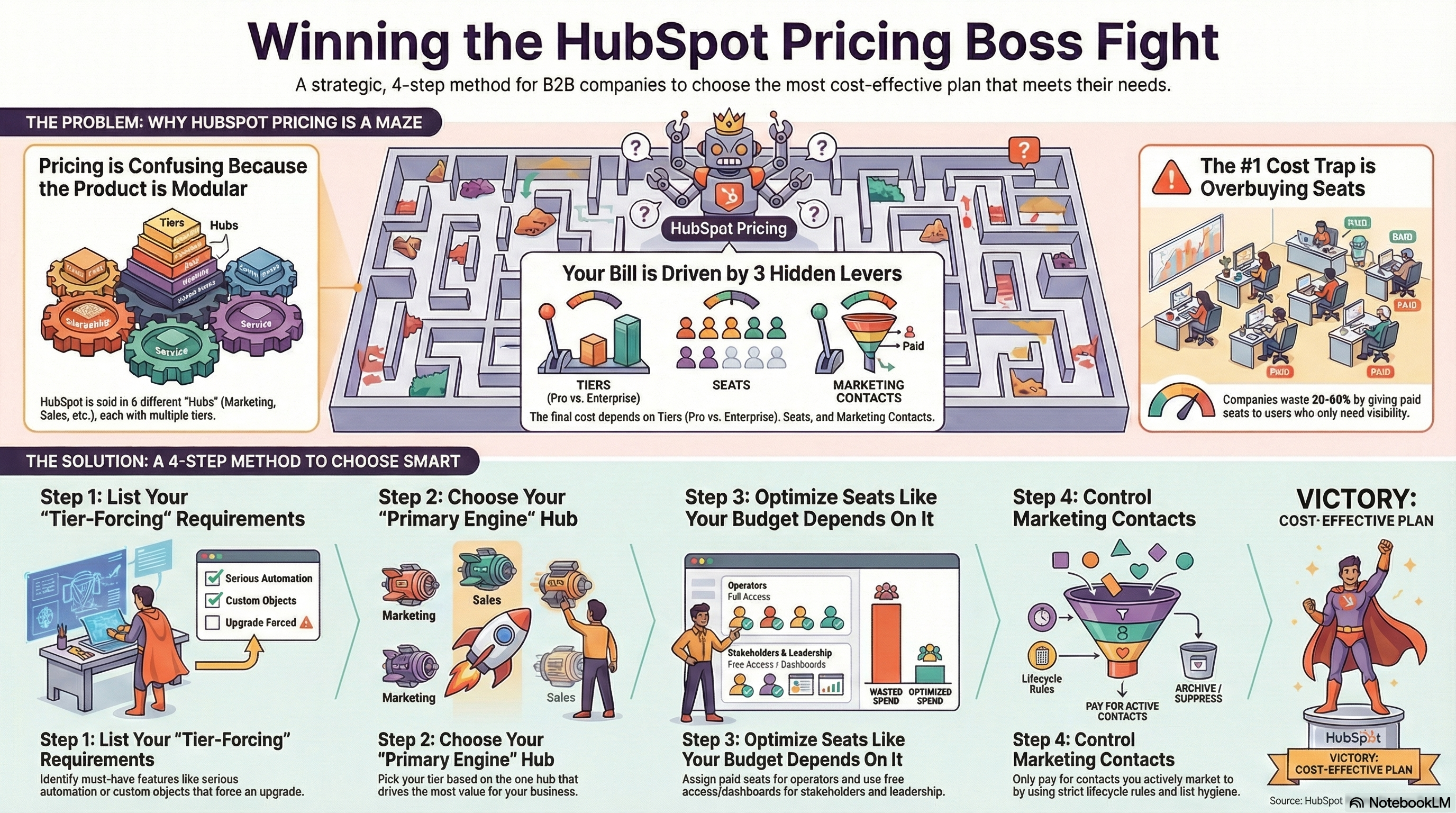
The 3 Levers That Actually Drive Your HubSpot Bill
Forget the marketing pages. Your cost is driven by three levers:
1) Tier (Starter vs Pro vs Enterprise)
Higher tiers unlock the things that make HubSpot powerful at scale:
- real automation depth
- reporting power
- governance and permissions
- advanced customization
- enterprise security features
2) Seats (Where budgets quietly die)
Most companies overpay here.
Not everyone needs a paid seat. Many people only need visibility, dashboards, or occasional access. One Reddit user said it perfectly:
“The seats are still super confusing, especially if one person needs multiple.”
True. And it is one of the most common cost traps.
3) Marketing contacts (The growth tax)
Marketing Hub pricing scales with how many contacts you market to. Poor lifecycle rules and list hygiene can cause your HubSpot cost to scale faster than revenue.
Hub-by-Hub: What You’re Actually Buying (In Plain English)
Marketing Hub: Growth Engine or Expensive Newsletter
Marketing Hub is where HubSpot becomes a machine.
Starter is for:
- basic email marketing
- forms and lead capture
- simple nurturing
Professional is for:
- workflows and real automation
- lead routing
- lead scoring
- A/B testing
- campaign tracking
- deeper segmentation
This is the tier where marketing ops stops being manual labor.
Enterprise is for:
- advanced governance
- stricter permissions
- complex org structures
- advanced analytics and reporting
Common misconception: “custom reporting is in Starter”
No. Not in the way people mean it. Basic reports exist, but custom reporting capabilities are typically a paid-tier feature, and you should confirm your exact reporting needs against the catalog and pricing docs.
Official references:
Sales Hub: Predictable Pipeline Is the Point
Sales Hub turns HubSpot into a revenue operating system.
Starter works if:
- you need pipeline visibility
- basic deal tracking
- meetings
- simple reporting
Professional is where real scaling starts:
- sequences (automated outreach)
- deeper automation
- more robust reporting and forecasting
Enterprise is for:
- advanced governance and permissions
- complex team structures
- advanced forecasting needs
- large sales org control
Official reference: Sales Hub pricing
Service Hub: Customer Retention Without Chaos
Service Hub is customer success and support tied into the CRM.
Key features:
- ticketing
- routing and SLAs
- knowledge base
- customer portal
- chat and bots
- NPS/CSAT surveys
Professional becomes essential once you need consistent routing, SLAs, and scale.
Official reference: Service Hub pricing
Content Hub (CMS): A Website That Actually Talks to Revenue
Most CMS platforms live in a separate universe from your CRM.
HubSpot’s CMS does not.
That is the advantage: content performance and pipeline performance live in one data model.
Use it if:
- you want native personalization
- clean attribution
- landing pages tied directly to lifecycle and revenue
Operations Hub: The Most Underrated Hub
Every scale up eventually becomes a data problem.
Ops Hub exists to prevent the CRM from becoming a junkyard.
It helps with:
- data sync
- data formatting and health
- programmable automation
- datasets that make reporting sane
If you have multiple tools, multiple data sources, or complex integrations, Ops Hub is often the missing link.
Commerce Hub: Revenue Ops Grows Up
Commerce Hub brings payments, invoicing, and subscriptions closer to the CRM.
Not essential for every B2B org today, but powerful if:
- you sell recurring subscriptions
- you want real revenue visibility
- you want tight quote-to-cash workflows
The GrowthHub Method: How to Pick the Cheapest Plan That Works
Most companies do this wrong.
They buy based on:
- budget fear
- sales pressure
- future growth fantasies
- or whatever tier “sounds enterprise-y”
Instead, use this method:
Step 1: Write your “tier-forcing” requirements
These features force upgrades. If you need them, stop pretending Starter will work.
Common tier-forcers:
- workflows and serious automation
- sequences
- forecasting leadership will trust
- knowledge base + customer portal
- custom objects
- advanced permissions and governance
- advanced reporting and datasets
- programmable automation
Step 2: Choose your “primary engine hub”
Every business has one hub that drives value:
- Marketing-led? Marketing Hub
- Sales-led? Sales Hub
- Retention-led? Service Hub
- Data-heavy? Operations Hub
Pick your tier around that engine, then layer the rest.
Step 3: Optimize seats like your budget depends on it (because it does)
Seat strategy is where companies overspend by 20 to 60%.
Rule:
- paid seats for operators
- free access for stakeholders
- dashboards for leadership
- avoid paying for “visibility” users
Step 4: Control marketing contacts before marketing contacts control you
Only pay for contacts you actively market to.
Use:
- strict lifecycle stages
- suppression lists
- unengaged contact suppression
- customer suppression
- regular cleanup automation
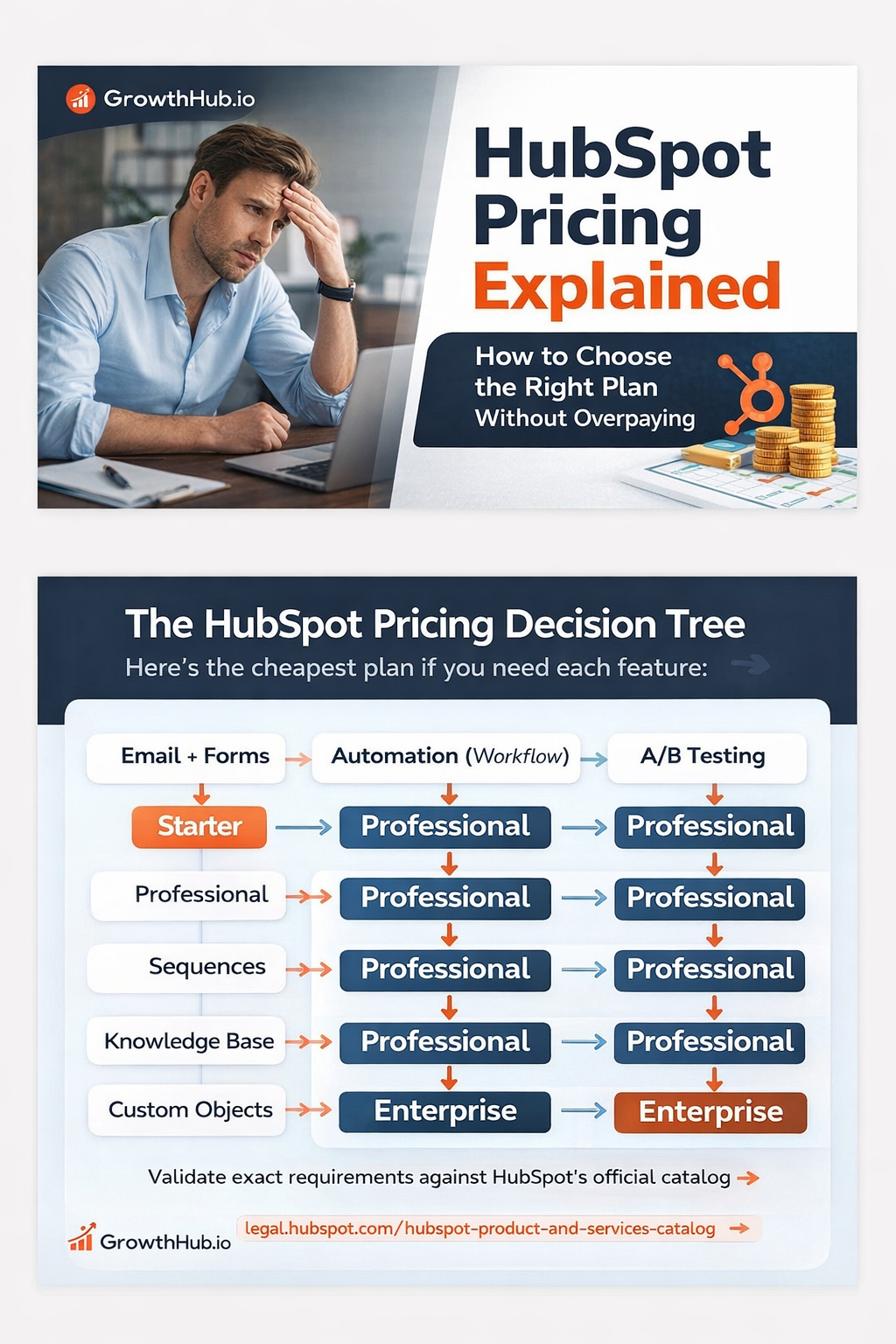
The “Pricing Agent” Decision Tree: If You Need X, What’s the Cheapest Tier?
Use this to quickly figure out what tier you actually need, then confirm against the catalog:
HubSpot Product & Services Catalog
Marketing and Automation
- You need basic email marketing + forms: Marketing Hub Starter
- You need workflows and real automation: Marketing Hub Professional
- You need A/B testing: Marketing Hub Professional
- You need enterprise governance and advanced permissions: Marketing Hub Enterprise
- You need meaningful social publishing + monitoring inside HubSpot: Usually Professional or above (confirm scope)
Sales
- You need pipeline tracking + deal stages: Sales Starter (or Free CRM depending on needs)
- You need sequences: Sales Hub Professional
- You need forecasting tools leadership trusts: Sales Hub Professional or Enterprise depending on complexity
- You need strict access control and enterprise governance: Sales Hub Enterprise
Service
- You need basic tickets + inbox: Service Free or Starter
- You need knowledge base + customer portal + scalable routing: Service Hub Professional
- You need complex routing, SLAs, enterprise controls: Service Hub Enterprise
Custom Objects (The #1 Enterprise Trigger)
- You need custom objects: Cheapest path is typically an Enterprise tier (confirm in the catalog)
Reporting (Where people get burned)
- You need standard dashboards and reports: Starter may work (basic reporting)
- You need custom reporting and advanced analytics: Professional or above (confirm exact scope)
Three Real-World HubSpot Package Setups (That Actually Work)
1) Sales-First B2B Scale Up (Best early ROI)
- Sales Hub Professional
- CRM core
- Marketing Starter (upgrade later)
- Service Starter (optional)
Best for:
- outbound-driven pipeline
- higher ACV deals
- founder-led sales becoming a real sales org
2) Inbound Growth Machine (Marketing-led)
- Marketing Hub Professional
- Sales Hub Professional
- Operations Hub Starter/Pro
- Content Hub if you want website + CRM tied together
Best for:
- inbound + paid acquisition
- lifecycle automation
- lead routing
- conversion optimization
3) Enterprise Revenue Platform (Scale without pain)
- Enterprise bundle
- Operations Hub Pro/Enterprise
- governance (permissions, SSO, audit logs)
- business units if multi-brand
Best for:
- multi-team organizations
- multiple regions or brands
- strict internal controls
- complex reporting needs
How to Reduce HubSpot Cost Without Downgrading Your Business
HubSpot is expensive.
But “expensive” often means “misconfigured.”
Here is where you save money without losing capability:
- Stop overbuying seats
- Clean your marketing contact strategy
- Use Ops Hub to replace middleware and manual cleanup
- Buy Professional now, earn Enterprise later
- Map workflows first, then choose tiers (never the other way around)
Final Take: HubSpot Is Expensive, but CRM Failure Is Pricier
HubSpot pricing is frustrating because it’s complex.
But the alternative is usually worse:
- fragmented tools
- broken attribution
- low adoption
- fragile reporting
- and migrations that steal months of your team’s life
HubSpot is expensive.
But switching is worse.
And if you are building a serious B2B revenue engine, the safest long-term bet is the platform that is stable, trusted, and compounding.
That is HubSpot.
Want the cheapest plan that meets your exact requirements?
If you share:
- team size (marketing, sales, service)
- number of marketable contacts
- must-have workflows and reports
- your current stack
GrowthHub will map:
- the minimum viable tier configuration
- seat strategy
- contact strategy
- and a rollout plan
So you get HubSpot power without HubSpot waste.

Join the Conversation
Share your thoughts and connect with other readers