How We Built an AI Support Chatbot That Knows HubSpot
Most AI chatbots are glorified search bars wrapped in a chat bubble. They hallucinate. They dodge questions. They frustrate the exact people they're supposed to help.
We built something different. Max is a free AI-powered HubSpot support assistant trained on 1,600+ knowledge base articles, basically our website sitemap and all our internal knowledge.
Ask it about workflows, lifecycle stages, custom reports, HubDB, lead scoring, integrations — it gives you a real answer grounded in actual documentation. No login. No email gate. No paywall.
This is the full technical breakdown of how we built it, what decisions we made, and why. If you're considering building a support chatbot for your own product or service, this is your blueprint.
The Problem We Were Solving
Running an agency where your customers use a complex product like HubSpot means fielding the same questions over and over. "How do I set up a workflow trigger?" "What's the difference between lifecycle stage and lead status?" "Can I create a custom report that does X?"
The answers exist. They're scattered across the Internet in knowledge bases, Reddit, fora, eBooks, websites — thousands of articles, constantly updated, organized in ways that make them hard to find. We needed an assistant that could surface the right answer instantly, based on the actual documentation, not on whatever an LLM hallucinated from its training data.
The requirements were simple:
- Accurate answers grounded in real documentation: Every response must come from a real source, not generated from thin air.
- No hallucinations: If the answer isn't in the knowledge base, say so honestly.
- Conversational memory: Users should be able to ask follow-up questions naturally without repeating context.
- Fast responses: Under 5 seconds. Nobody waits 30 seconds for a chatbot answer.
- Free and ungated: No email capture required. The quality of the tool is the marketing.
Step 1: Ingesting the Knowledge Base
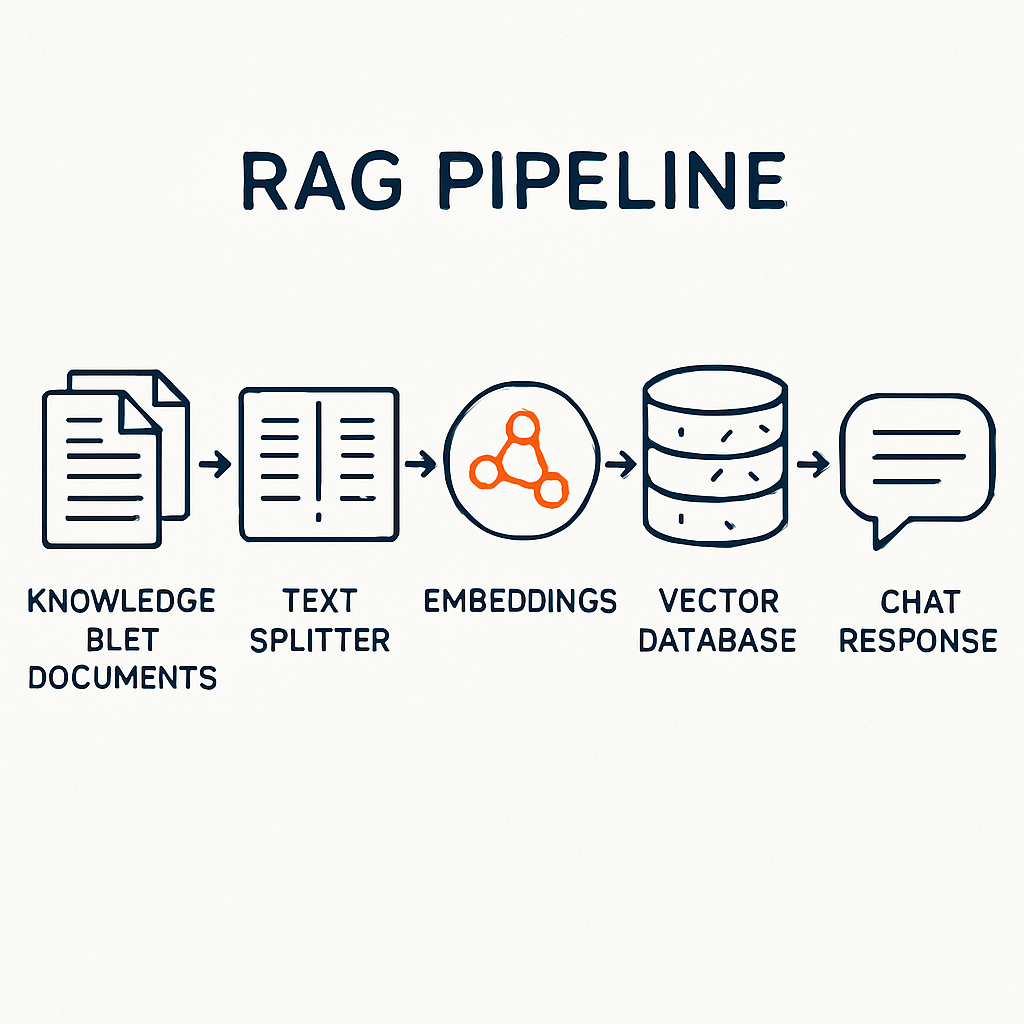
The first step is getting your documentation into the pipeline. We built an automated n8n workflow that ingests content from multiple source formats — web pages, PDFs, EPUBs, internal docs, help articles, FAQs, SOPs — whatever we had and whatever is available on the Internet.
The ingestion workflow handles:
- Source discovery: Identifying and collecting all relevant documentation. For most clients this means connecting to their content management system, websites, Intranet, Wikis, Google Drive, Notion, Confluence, or help desk platform.
- Content extraction: Pulling clean text from whatever format the docs live in. PDFs, EPUBs, HTML pages, markdown files — the pipeline handles all of them.
- Text cleaning: Stripping navigation elements, headers, footers, sidebars, and scripts — leaving only the actual article content. This is critical. If you feed raw HTML to a vector database, you get garbage results because the model retrieves navigation menus instead of article content.
- Deduplication: Ensuring the same content doesn't get ingested twice, even across different source formats.
For Max, we ingested 1,600+ resources covering every product, feature, and workflow. The full ingestion takes roughly 4 hours for a knowledge base of this size.
Step 2: Chunking and Embedding the Content
You can't feed an entire article into a language model and expect precise answers. Articles range from 500 to 5,000+ words. The model needs small, focused chunks of text to retrieve the most relevant information.
We use a Recursive Character Text Splitter that breaks each article into chunks of approximately 2,000 characters with 200 characters of overlap. The overlap ensures that context isn't lost at chunk boundaries — if a sentence spans two chunks, both chunks contain the full sentence.
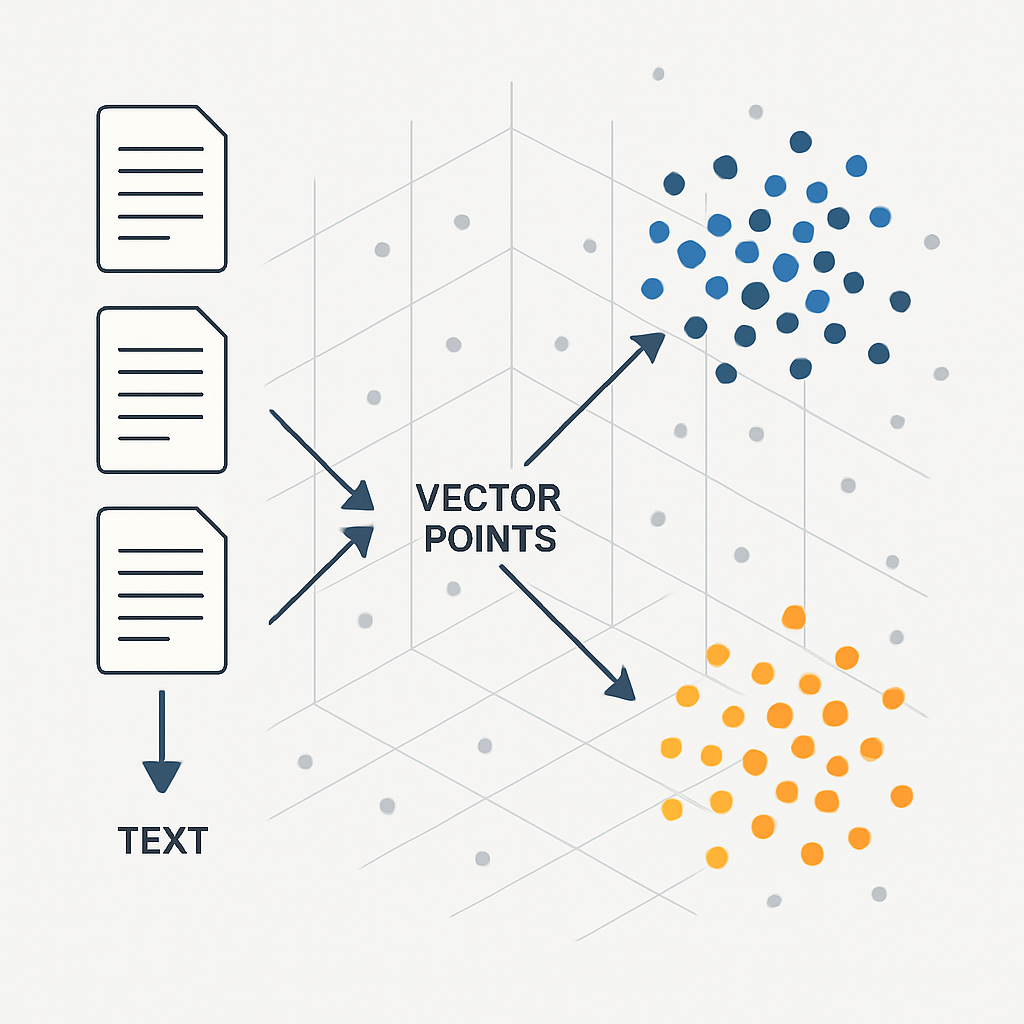
Each chunk gets transformed into a vector embedding using OpenAI's text-embedding-3-small model. This converts the text into a 1,536-dimensional numerical representation that captures its semantic meaning. Two chunks about "setting up HubSpot workflows" will have similar vectors, even if they use different words.
Why text-embedding-3-small instead of the larger model? Cost and speed. For a knowledge base of this size, the smaller model delivers excellent retrieval accuracy at a fraction of the cost. The quality difference is negligible for support documentation.
Step 3: Storing Vectors in Qdrant
The embedded chunks need to live somewhere they can be searched fast. We chose Qdrant — an open-source vector database that we self-host on our own infrastructure.
Why Qdrant over Pinecone, Weaviate, or ChromaDB?
- Self-hosted: The data stays on our server. No third-party cloud dependency. This matters for clients in regulated industries who need data residency guarantees.
- Performance: Qdrant handles millions of vectors with sub-100ms search times. For our 1,600 articles chunked into roughly 8,000+ vectors, searches return in under 50 milliseconds.
- Advanced filtering: We can filter by metadata — article category, date, subscription tier — during vector search. This means we can scope searches to specific HubSpot products if needed.
- No vendor lock-in: It runs in a Docker container. If we need to move it, we move it.
The Qdrant collection is configured with Cosine distance similarity, which works best for normalized text embeddings.
Each stored point contains the text chunk, the embedding vector, and metadata including the source URL, article title, and category.
Step 4: The RAG Pipeline — How Retrieval Actually Works
RAG stands for Retrieval-Augmented Generation. It's the architecture that makes the chatbot accurate instead of hallucinatory.
Here's exactly what happens when a user asks a question:
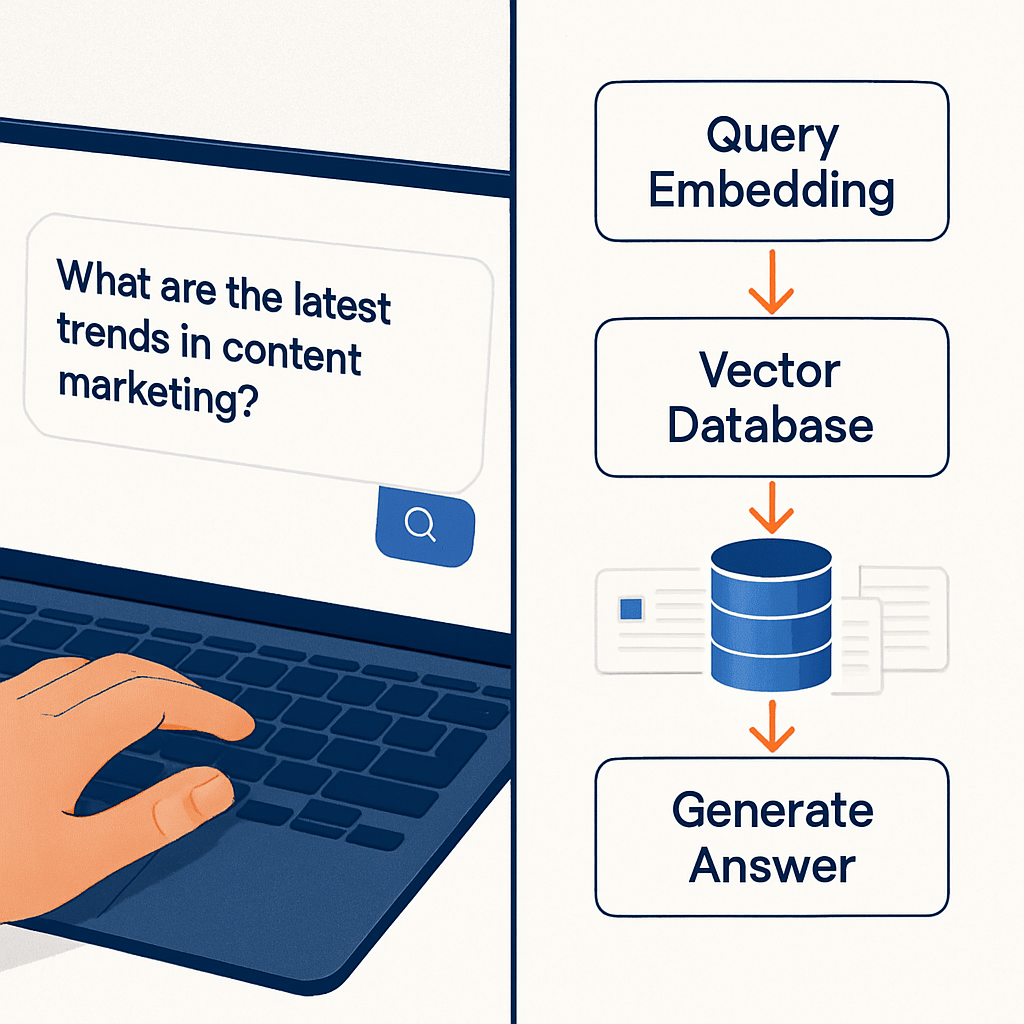
- User sends a message: "How do I create a custom report in HubSpot?"
- Query embedding: The question gets embedded into a vector using the same OpenAI model we used for the knowledge base.
- Vector search: Qdrant searches for the 8 most semantically similar chunks in the knowledge base. This returns the most relevant documentation snippets, ranked by similarity.
- Context injection: The retrieved chunks are injected into the LLM prompt as context. The model doesn't rely on its training data — it reads the actual documentation and generates an answer based on that.
- Response generation: The LLM produces a natural language answer, citing the specific steps, menu paths, and subscription requirements from the retrieved documentation.
This is fundamentally different from a standard chatbot. A standard ChatGPT wrapper generates answers from whatever it learned during training — which might be outdated, incomplete, or simply wrong. A RAG-powered chatbot generates answers from your actual, current documentation. If HubSpot updates their UI tomorrow, we re-ingest, re-embed, and the chatbot knows about the change.
Step 5: Choosing the Right Language Model
We're model-agnostic. The RAG architecture works with any LLM. For Max, we evaluated several options:
- OpenAI GPT-4o: Excellent quality, higher cost, slower response times for a support chatbot.
- Claude (Anthropic): Outstanding reasoning and nuance, more expensive, better for complex content generation.
- Grok (x.ai): Fast response times, strong quality, good cost-to-performance ratio for support tasks.
- Groq: Extremely fast inference, free tier available, good for high-volume chatbots.
- Open-source (Llama, Mistral): Can be self-hosted for full data privacy, requires GPU infrastructure.
For Max, we went with Grok. The reasoning: support questions need fast answers. Users won't wait 10 seconds. Grok delivers sub-3-second responses with quality that's more than sufficient for documentation-based Q&A.
The model doesn't need to be creative or philosophical — it needs to accurately relay what's in the retrieved documentation.
For clients who need absolute data privacy, we can deploy open-source models on dedicated infrastructure. The LLM is a swappable component. Change the model, keep everything else.
Step 6: The Chat Interface
Max runs on a custom chat interface embedded directly on our HubSpot website. Not an off-the-shelf widget. Not a third-party iframe. A purpose-built frontend that matches our brand and gives us full control over the user experience.
The interface handles:
- Session management: Each user gets a unique session ID. The chatbot maintains conversation history within the session, so users can ask follow-up questions naturally. "What about for Enterprise?" works because the model remembers the previous question was about custom reports.
- HTML formatting: Responses render with proper formatting — numbered steps, bold text, code snippets, and links. Not raw markdown dumped into a chat bubble.
- Conversation logging: Every interaction gets logged to a Google Sheet for analysis. This tells us what users are actually asking, where the chatbot struggles, and what knowledge gaps exist in the documentation.
- Soft lead capture: After delivering genuine value across 3+ exchanges, the chatbot may offer to email a summary of the solution. No gates. No interruptions. Help first, always.
Step 7: The Orchestration Layer — n8n
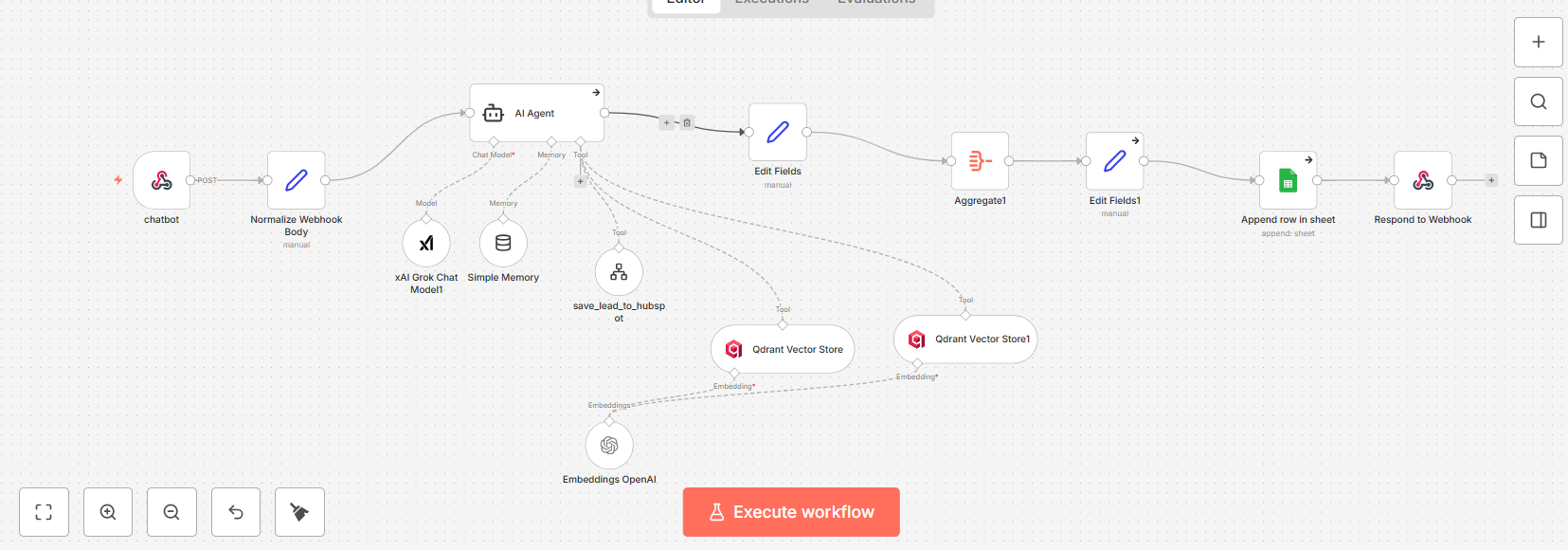
The entire pipeline is orchestrated by n8n — an open-source workflow automation platform we self-host. n8n connects every component:
- Chat webhook: Receives incoming messages from the frontend.
- AI Agent node: Manages the conversation, system prompt, and tool orchestration.
- Vector Store Tool: Searches Qdrant for relevant documentation chunks.
- Embedding node: Generates query embeddings using OpenAI.
- Memory node: Maintains session context across multiple messages.
- Logging: Records conversations to Google Sheets for analytics.
- Lead capture tool: Saves contact information to HubSpot CRM when provided.
Why n8n over building custom code? Speed of iteration. We can modify the system prompt, swap the LLM, adjust retrieval parameters, or add new tools without touching code. The visual workflow makes it easy to debug — click on any node, see exactly what went in and what came out.
Step 8: Automated Knowledge Base Updates
A chatbot trained on stale documentation is worse than no chatbot at all. We built an automated ingestion pipeline that keeps the knowledge base current.
The update workflow monitors source content and processes changes automatically:
- SHA256 hashing: Each document gets a unique hash based on its content. When the pipeline runs, it compares the current hash against the stored hash. If the content has changed, it re-processes the document.
- Record manager: A Google Sheet tracks every processed document — its ID, hash, and name. New documents get added. Updated documents get re-embedded. Nothing gets duplicated.
- Multi-format ingestion: The pipeline handles PDFs, EPUBs, web pages, and HTML documents. We use n8n's built-in data loaders to extract text from any format, chunk it, embed it, and store it in Qdrant.
This same architecture powers our ebook knowledge base — a separate Qdrant collection containing 10 own HubSpot ebooks we send to customers for onboarding (1,690+ vector points) that we use
The Full Tech Stack
Here's everything that powers Max, laid out plainly:
- Orchestration: n8n (self-hosted, Docker)
- Vector database: Qdrant (self-hosted, Docker)
- LLM: Grok via x.ai API (swappable)
- Embeddings: OpenAI text-embedding-3-small
- Frontend: Custom chat interface on HubSpot CMS
- Logging: Google Sheets
- Lead capture: HubSpot CRM
- Infrastructure: VPS (Ubuntu 24.04)
- Reverse proxy: Traefik
- Knowledge source: 1,600+ knowledge base articles
Total monthly infrastructure cost: under €30. That covers the VPS, the API calls for embeddings and LLM inference, and nothing else.
No SaaS subscriptions. No per-seat licensing. No vendor lock-in.
What We Learned Building This
A few things became clear during the build that weren't obvious at the start:
- HTML cleaning is everything: The quality of your chatbot depends almost entirely on the quality of the text you feed into the vector database. If you ingest raw HTML with navigation menus, footers, and cookie banners, the model will retrieve those instead of article content. Spend serious time on cleaning.
- Chunk size matters more than model choice: We tested chunks from 500 to 4,000 characters. 2,000 characters with 200 overlap hit the sweet spot — large enough to contain complete thoughts, small enough to be precise during retrieval.
- Top-K retrieval needs tuning: Retrieving too few chunks (3-4) misses relevant context. Retrieving too many (15+) dilutes the signal with noise. We settled on 8 chunks per query.
- Fast models beat smart models for support: Users care about speed. A slightly less sophisticated model that responds in 2 seconds outperforms a brilliant model that takes 10 seconds. For support Q&A, the retrieved context does the heavy lifting — the model just needs to format it clearly.
- Log everything: Conversation logs reveal exactly what users need that your documentation doesn't cover. Every unanswered question is a content gap you can fill.
What This Means for Your Business
Max is a showcase. It demonstrates what a production-grade AI support chatbot looks like when it's built on real architecture instead of duct-taped onto a ChatGPT wrapper.
The same pipeline works for any business with a knowledge base. SaaS products, professional services, e-commerce, healthcare, fintech — if you have documentation, FAQs, or support articles, you can have an AI assistant that actually knows your product.
What changes per client is the data source, the LLM selection, the branding, and the compliance requirements.
The architecture stays the same. The pipeline stays the same. The result stays the same: instant, accurate answers grounded in your actual content.
We typically deploy a production chatbot in 1-2 days depending on the client's tech stack and content volume. That includes scraping and ingesting the knowledge base, configuring the RAG pipeline, building the chat interface, testing retrieval quality, and tuning the system prompt.
If your support team is drowning in repetitive tickets, or your customers are waiting hours for answers that already exist in your documentation, this is the fix. Not a chatbot that guesses. A chatbot that knows.
What's Next for Max
Right now Max handles each conversation independently — it doesn't remember you from last time.
That's fine for one-off support questions, but we want to go further.
We're experimenting with persistent memory layers like Supermemory that would let Max remember your HubSpot setup, your subscription tier, the issues you've dealt with before, and the solutions that worked.
Imagine a support assistant that already knows your tech stack when you come back with a new question.
That's where we're headed.
Try Max for free and see for yourself. Then book a strategy call if you want one for your business.

Join the Conversation
Share your thoughts and connect with other readers